Offline-First vs Cloud Inspection Software for Mining

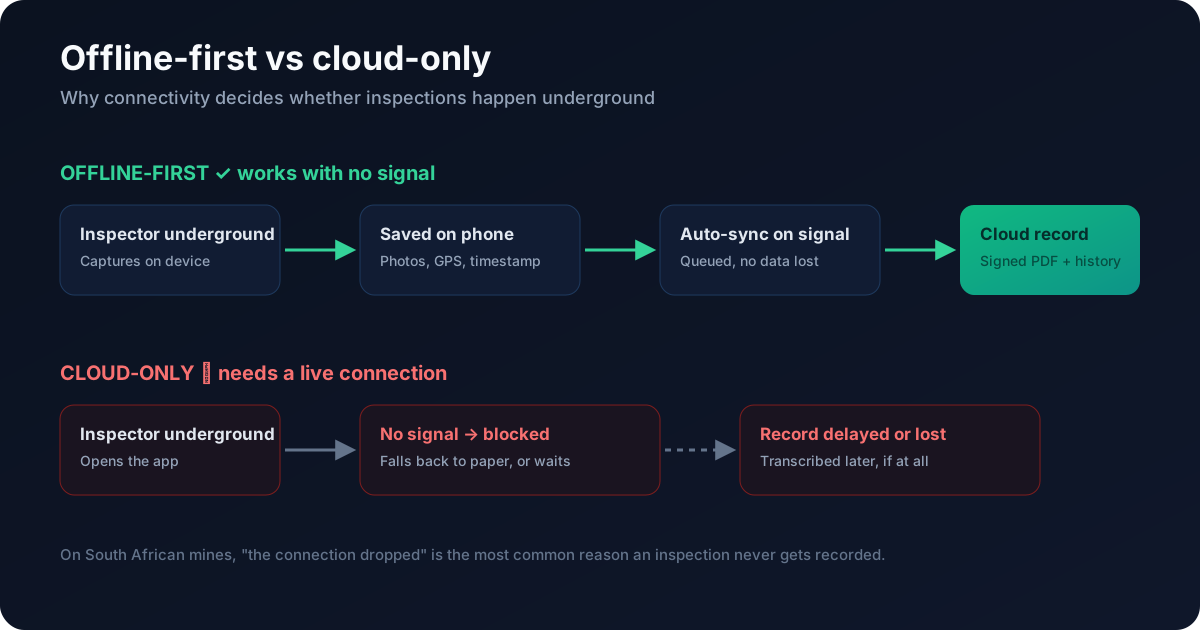
Offline-first inspection software captures inspections directly on the device — including photos, GPS and timestamps — and syncs to the cloud automatically when a connection returns, so it works underground and in remote areas with no signal. Cloud-only software needs a live connection to load forms and save records, so on a mine it often means inspections either do not happen or fall back to paper. For mining, offline-first is not a nice-to-have; it is what determines whether the record exists at all.
What does "offline-first" actually mean?
Offline-first is an architecture, not a feature toggle. The app is built to run entirely on the device by default: it stores your templates, lets you complete inspections, and captures media locally, then treats the cloud sync as something that happens when it can, in the background. "Cloud with an offline mode" bolted on later usually behaves differently — some things work, some silently do not.
Why connectivity decides whether inspections get recorded
On a South African mine, signal is unreliable by nature — underground workings, remote pits, and shielded areas. If your inspection app needs a connection to:
- load the checklist,
- save a completed inspection, or
- upload a photo,
then the moment signal drops, the inspection stops. The realistic outcomes are: it gets skipped, it gets done on paper and maybe transcribed later, or it gets lost. Every one of those is an audit gap waiting to become a finding.
Offline-first vs cloud-only: the trade-offs
| Offline-first | Cloud-only | |
|---|---|---|
| Works with no signal | Yes | No |
| Photos/GPS captured on-device | Yes | Needs connection |
| Data loss risk when signal drops | Low (queued) | High |
| Best for | Mines, remote/field sites | Office-bound, always-connected work |
Cloud-only tools are perfectly fine for always-connected, office-based work. The problem is specifically the mining and heavy-industry field environment.
What to check in a demo
Ask to test the tool in aeroplane mode: complete a full inspection, capture several photos, then re-connect and confirm everything syncs with nothing lost. If the vendor cannot show that cleanly, it is not truly offline-first.
Then push the test closer to a real shift:
- Start offline, not just finish offline. Close the app, switch on aeroplane mode, and open a checklist you have not used that day. If the form will not load, it was never stored on the device.
- Raise a finding offline. Fail an item and confirm the issue, its owner and its due date are created and survive the sync, not just the ticked boxes.
- Run two devices. Complete inspections on two phones while both are offline, then reconnect them one after the other and check that neither overwrites the other.
- Check what the inspector sees. The phone should show which inspections are still waiting to sync, so nobody hands in a phone assuming the record is already on the server.
How Inspecable handles offline
Inspecable is offline-first by design: inspections, HIRA and photos are captured on-device and queued, then sync automatically when connectivity returns — no data lost, with GPS and timestamps intact for audit evidence. It is a core reason mines choose it over general-purpose apps. See how it factors into choosing SHEQ software.
Frequently asked questions
What is the difference between offline-first and cloud-only inspection software?
Offline-first software captures inspections, photos, GPS and timestamps on the device and syncs to the cloud when a connection returns, so it works with no signal. Cloud-only software needs a live connection to load forms and save records, so it fails where there is no signal.
Why does offline capability matter for mining?
Because signal is unreliable underground and in remote pits. If the app needs a connection to work, inspections get skipped, done on paper, or lost — creating audit gaps. Offline-first keeps the record intact regardless of connectivity.
How do I test whether an app is truly offline-first?
Run a full inspection in aeroplane mode, capture several photos, then reconnect and confirm everything syncs with nothing lost. If that does not work cleanly, the app is not genuinely offline-first.
Ready to Transform Your Mining Operations?
Run your inspections on a phone with no signal, and close every failed item with evidence and a signature.
About Inspecable Team
Mining Safety & Compliance Specialists
We help South African mines and process plants run inspections offline on Android, turn every failed item into a tracked action with an owner and a due date, and close actions only with a method, evidence and a signature.
Related Articles
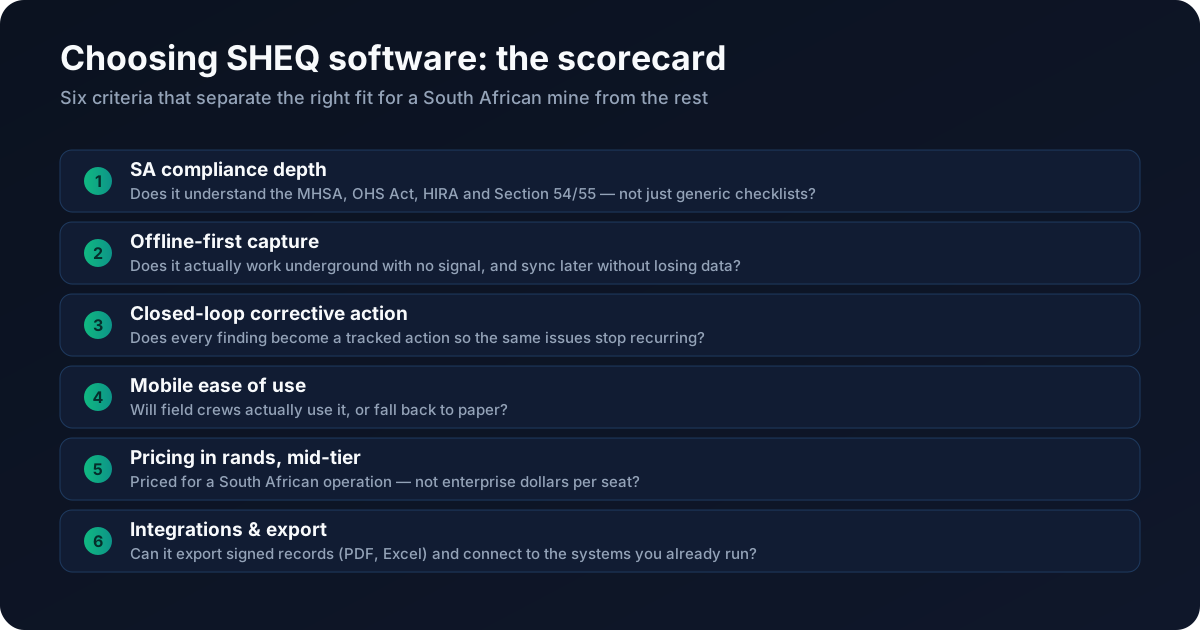
How to Choose SHEQ / Inspection Software in South Africa
Most SHEQ tools demo well. The right one for a South African mine is decided by six things: compliance depth, offline capture, closed-loop action, ease of use, ZAR pricing and integrations.
Best Mining Safety Software in South Africa (2026): An Honest Comparison
There is no single "best" mining safety software — there are categories with different trade-offs. Here is an honest map of the options for a South African operation, and how to choose.
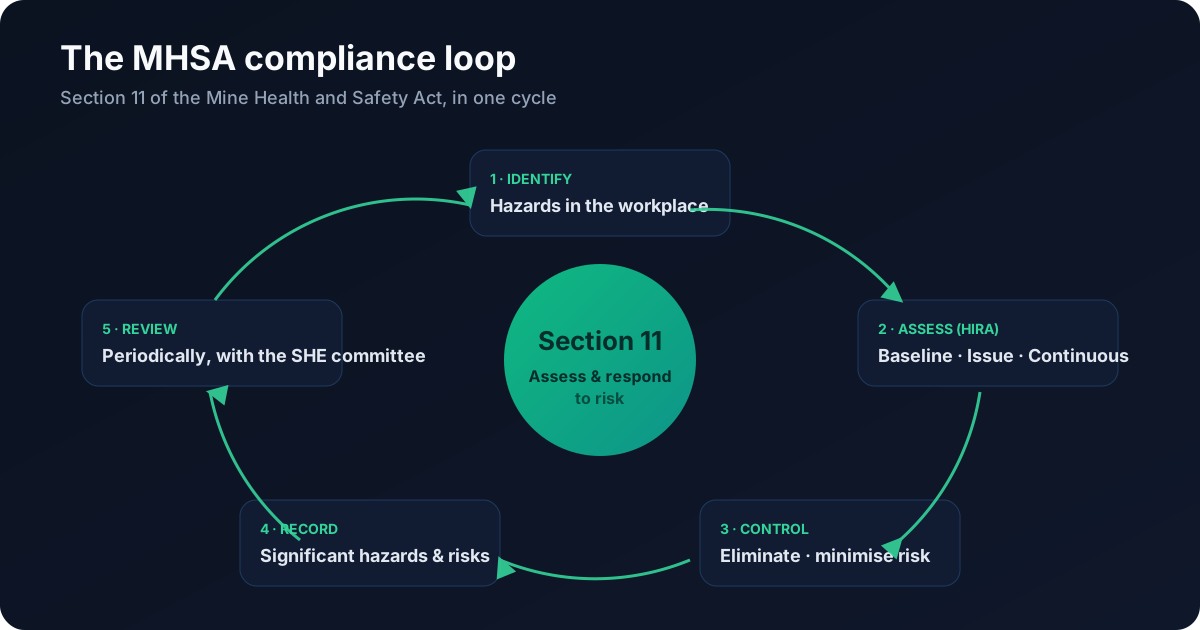
The Complete Guide to MHSA Compliance for South African Mines
MHSA compliance comes down to a repeatable loop: identify hazards, assess the risk, control it, record it, and review. Here is how each part works — and how to keep the paperwork ready for an inspector.